
Pomodoro timer
Focus for 25. Rest for 5.
A free pomodoro timer online. The same one you get inside SayBriefly.
25 minutes, one task
Pick one thing and work only on that until the timer rings. Then a 5 minute break. After four rounds, a longer one.

A clock beats willpower
A short, fixed block makes starting easy and stopping guilt-free.

Run it on a real task
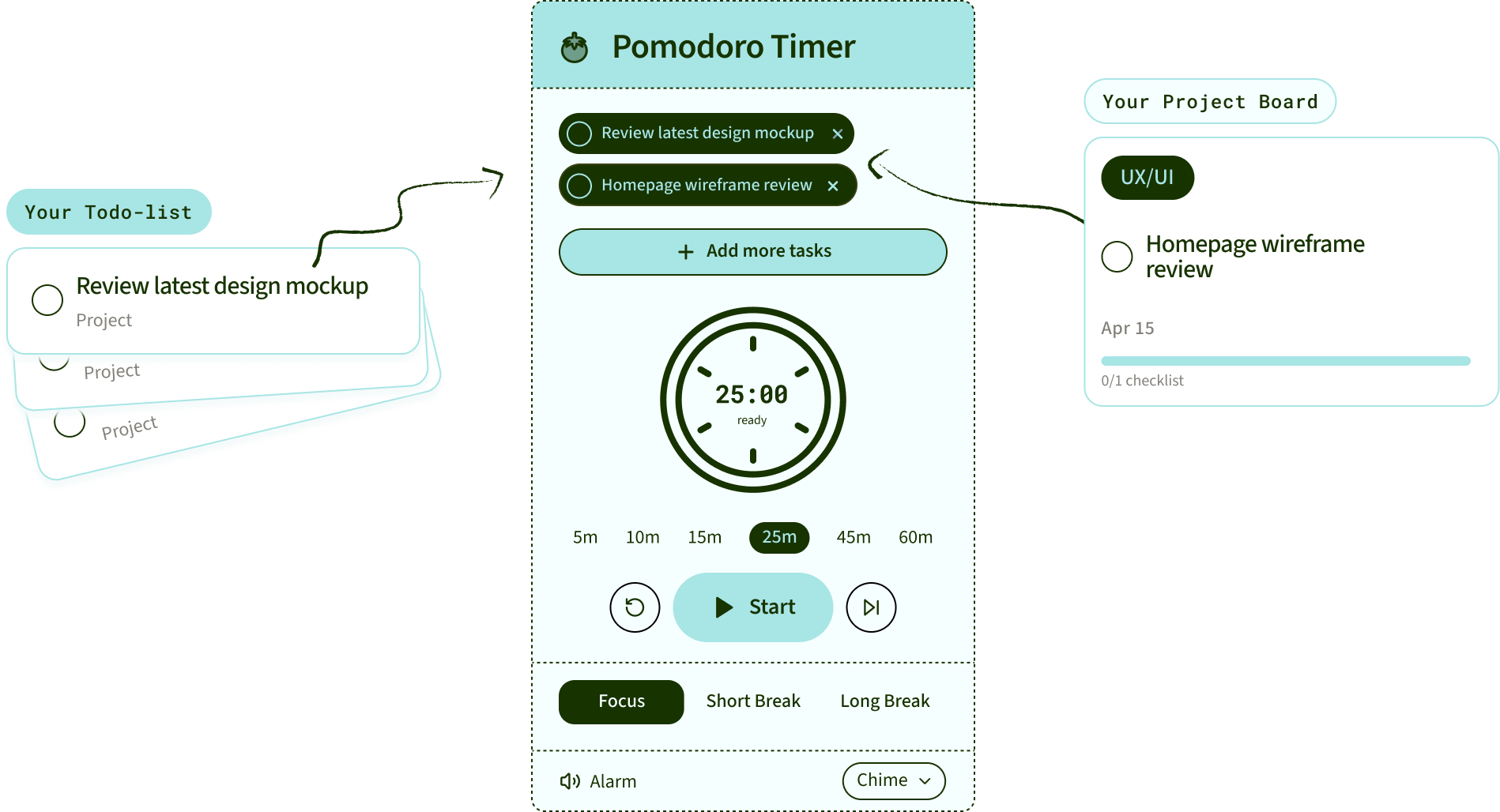
In SayBriefly, hit play on any to-do or project card. The timer knows what you're working on.
The timer is the easy part.
Knowing what to focus on isn't.
SayBriefly builds your to-do list from your meetings and email, plans your day, and puts a pomodoro on every task.
What is the Pomodoro Technique?
Work in short sprints.
Rest on purpose.

The Pomodoro Technique is a time management method: you work on one task for 25 minutes, take a 5-minute break, and after four rounds take a longer break of 15 to 30 minutes. Francesco Cirillo created it in the late 1980s and named it after the tomato-shaped kitchen timer he used as a student (pomodoro is Italian for tomato).
The timer at the top of this page is a free pomodoro timer online, with no signup. In the SayBriefly app, the same timer runs on any task on your to-do list or project board, and those tasks fill themselves from your meetings and email.
How to use a pomodoro timer
Five steps. That's the whole method.
1. Pick one task
One thing, written down. Not “work on the website”, but “write the homepage headline”.
2. Set 25 minutes
Start the timer and work only on that task until it rings.
3. Take 5 minutes
Stand up, stretch, get water. Not your inbox.
4. Repeat four times
Each round is one pomodoro. Four pomodoros make a set.
5. Take a long break
15 to 30 minutes after every four rounds, then start again.
Interrupted? Start over
If something breaks the round, note it and restart the 25 minutes. The round only counts when it's whole.
Pomodoro time management
Why the pomodoro method works.
Starting gets easy.
25 minutes is small
A task you've avoided all day feels possible when you only owe it 25 minutes. Most of the time, you keep going.
Breaks stop the slump.
Rest is part of the plan
Short, scheduled breaks keep your energy up through the afternoon, instead of crashing at 3pm.
Distractions wait their turn.
Note it, don't do it
Something pops into your head mid-round? Write it down and deal with it in the break.
You see where time goes.
Rounds are easy to count
Counting pomodoros shows how long tasks really take, which makes the next estimate honest.

A pomodoro app that knowswhat to work on.
Most timer apps don't know what you should be working on. In SayBriefly the timer runs on real tasks, the ones that came from your calls, your email and your project boards.
Hit play on any task.
Start a pomodoro right from your to-do list or a card on the project board.
Know what the next pomodoro is for.
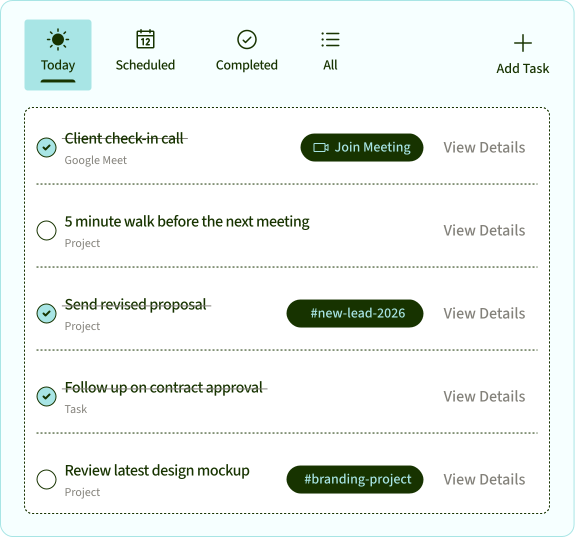
Plan My Day picks what matters today, so the next round always has a task waiting.
Pomodoro timer apps,
side by side.
← Scroll to compare →




Free timer, no signup

app
app
Timer on your task list
simple list

Keeps you off your phone
Tasks arrive from your meetings and email
Timer on project board cards
Checked September 2026 from each product's public website and independent 2026 reviews.
Pomodoro technique for studying
Study in rounds,
not marathons.

One topic per round
A chapter, a problem set, one essay section. Small enough to finish in 25 minutes.
Recall in the break
Spend one minute of the break saying what you just learned. It sticks better.
Plan the day's rounds
Decide how many pomodoros each subject gets before you start, then follow the plan.
Find your rhythm
Pomodoro timings that work.
25 / 5The classic. Best for getting started, admin, email and anything you've been avoiding.
 50 / 10
For deep work that needs warm-up time, like design, writing or code.
For low-energy days or tasks you really don't want to do. Start tiny.
You don't need more willpower.
You need a smaller first step.

Built for brains that need a deadline to start
A pomodoro timer for ADHD focus.
For many people with ADHD, the hardest part is starting, and time slips away once you do. A visible timer gives the task a clear start and a clear end, and breaks give the restless part of your brain somewhere to go.
A deadline to start
25 minutes on the clock turns “later” into “now”.
Only your tasks
Your list only holds what's yours, so choosing the next round is easy.
Breaks you'll take
The timer tells you when to stop, so you don't burn out by lunch.
Pomodoro timer for Mac and Windows
On this page, or on your desktop.
Pomodoro timer online.
Free, no signup
Use the timer at the top of this page any time. It shows the time left in your browser tab and plays a sound when a round ends.
Pomodoro timer for Mac.
macOS 12 or later
In the SayBriefly desktop app, the timer runs on the tasks from your to-do list and project boards.
Pomodoro timer for Windows.
Windows 10 and 11
The same timer and the same tasks, on your PC.
Questions
What people ask about the pomodoro technique.
What is the Pomodoro Technique?
+
A time management method: work on one task for 25 minutes, take a 5-minute break, and after four rounds take a longer 15 to 30 minute break. Francesco Cirillo created it in the late 1980s and named it after his tomato-shaped kitchen timer.
Is this pomodoro timer free?
+
Yes. The timer on this page is free and needs no signup. The SayBriefly app adds the timer to your to-do list and project boards.
Why 25 minutes?
+
It's long enough to make real progress and short enough that starting feels easy. Many people also use 50/10 for deep work or 15/3 on low-energy days.
What should I do during the break?
+
Move, drink water, look away from the screen. Avoid email and social media, which tend to eat the break and the next round.
What if I get interrupted?
+
Note the interruption, deal with it later if you can, and restart the 25 minutes. A round only counts when it's uninterrupted.
Does the pomodoro technique work for studying?
+
Yes. Give each round one topic, spend a minute of the break recalling what you learned, and plan how many rounds each subject gets.
Does the pomodoro technique help with ADHD?
+
Many people with ADHD find a visible timer helps them start and keeps time from slipping away, and scheduled breaks make long days easier. It's a tool, not a treatment.
Is there a pomodoro timer app for Mac and Windows?
+
Yes. SayBriefly runs on Mac (macOS 12 or later) and Windows 10 and 11, with the timer on any task in your to-do list or project board.
What's the difference between this and a normal pomodoro app?
+
Most timer apps don't know what you should work on. In SayBriefly the timer runs on real tasks that come from your meetings, email and projects.
It's 4pm on a Friday. The brief is locked, the client is happy, and Scribbble already sent the meeting recap. You close the laptop.
That's the point.

“SayBriefly allows me to give my full awareness in meetings, enabling radical presence, relevant question-asking, and finding flow that was otherwise elusive when note-taking.”

Emma Joel, Creative Director
Itsmy Studio
“The AI summaries are incredibly accurate. Our entire team adopted SayBriefly within weeks, and our post-meeting clarity has never been better.”

Marcus Chen, Product Manager
Pixel Lab
“What used to take hours of note-taking and follow-up emails now happens automatically. SayBriefly is the assistant I didn't know I needed.”

Sarah Williams, Head of Design
Studio Bloom

The timer is the easy part.
Knowing what to work on isn't.
Tasks from your calls.
A plan for today.
A timer on every task.



2026 ©SayBriefly. All rights reserved.
Designed by @HustleJar