

The short answer
The booking is the front door. What matters is what the meeting was for.
- SayBriefly: best if your meetings serve clients. It covers the whole journey: a form that screens people before they get your time, leads kept even when they do not book, every booker saved as a contact, no-bot notes on the call, tasks after, and the next booking starts where the last one ended.
- Cal.com: best free and open source option, with payments on the free plan.
- SavvyCal: best for small teams that want round robin from the first paid plan.
- TidyCal: best one-time price.
- Google Calendar appointment schedules: best if you already live in Google.

We build SayBriefly, so here is our bias, and our limits up front. SayBriefly booking pages are simpler than Calendly's: no payments, no round robin, Google Calendar only. If you need those, the tools below are better, and we say which.
But here is the argument we think every Calendly alternatives list misses. A consultant does not want meetings. A studio does not want meetings. Nobody does. They want what a meeting is supposed to produce: a decision made, a deliverable agreed, a problem unblocked, a client who feels looked after. Scheduling apps are brilliant at the easiest part, finding a time, and then they walk away at the door.
A meeting without an outcome is just time on a calendar.
The calendar is the front door, not the point
Think about the last client relationship that went smoothly. It was never because booking was easy. It was because every call picked up where the last one ended, nobody had to repeat themselves, and promises made on a call actually happened. That is a memory problem, not a scheduling problem.
So SayBriefly does not stop at the booking. It follows the person from the first click to the tenth call.
The whole client journey, in one app
With Calendly, the journey is split across tools: a scheduler, a form tool, a CRM, a note taker, a to-do app. Each one knows a slice. In SayBriefly it is one path, and every step feeds the next.
- They find your link. You share saybriefly.com/yourname. Your photo, your colours, your logo. Times show in their own time zone, no account needed.
- They pick a time, then tell you who they are. They choose a day and a time, then fill your form. Build it yourself: text, email, phone, number, date, dropdowns, choices, checkboxes. Want to screen people first? Switch the link to the gated flow and the form comes before the calendar.
- Nobody slips away. If someone fills the form and leaves without picking a time, they are kept as a lead. You see them in Bookings and can schedule them yourself later.
- They become a contact. Everyone who books or fills a form lands in your Contacts on their own, with no typing and no separate CRM. From then on, their meetings, emails and notes collect on the same card.
- The booking is protected. Buffers before and after, a minimum notice, your approval if you want it, and busy times in Google Calendar block the slot.
- Before the call. Ask the agent, Scribbble, what is still open with them: tasks you owe, what they asked last time, what the brief says, and what they wrote in the form.
- During the call. SayBriefly records from your computer, with no bot joining, so they talk to you, not to a recorder.
- After the call. About a minute later: decisions, action items with owners, tasks on your to-do list, and the call filed in the client's project next to their emails and the brief.
- The next booking. When they book again, the new note opens with "Since last call": what got done, what is still open, what they asked for again and what changed.
Example of the layout with a made-up client. Real cards only show what is in your account.
That is the difference in one line: Calendly knows when Maria booked. SayBriefly knows who Maria is, what she needs, what you promised her, and what changed since you last spoke.
It works for anyone who serves clients
A design studio, an accountant, a coach, a lawyer, an agency account lead, or a team running internal check-ins: every recurring call has a goal behind it. Calendly helps them meet. SayBriefly helps them get somewhere, and keeps the thread of every relationship in one place.
And it protects the goal
Because SayBriefly remembers what was agreed, it notices when a client asks for something the brief does not cover, and shows you their exact words. You decide whether to include it, quote it or push back, before the goal quietly drifts.
Why people leave Calendly
From reviews on Trustpilot and Capterra, in the order they come up most.
1. The price per seat
Calendly charges per seat, and reviewers note that adding one more person means paying for another full seat. For a small studio the bill grows faster than the value.
2. Support
Recent reviews complain that support got harder to reach, with more AI chat and fewer answers.
3. The free plan is thin
Calendly's free plan allows one event type and one calendar connection. Most people outgrow it in a week.
4. Billing and refunds
Several reviews describe unexpected renewals and refunds that were hard to get.
5. Branding and control
Reviewers want more control over how their booking page looks. Calendly offers white-label on its Teams plan.
All 5 Calendly alternatives at a glance
| Tool | Best for | Free plan | Payments | Round robin | Form before the calendar | Contact linked to call notes and email | After the call |
|---|---|---|---|---|---|---|---|
 SayBriefly SayBriefly | Freelancers and studios | Included in SayBriefly | No | No | Yes, gated flow | Yes, automatically | No-bot notes, tasks, project memory |
 Calendly Calendly | Reference | 1 event type | Stripe, PayPal (paid plans) | Teams plan | Routing forms (paid) | No | Notetaker bot, recaps |
 Cal.com Cal.com | Free, open source | Yes, 1 user | Stripe, PayPal (free too) | Teams plan | Routing forms | No | Not stated |
 SavvyCal SavvyCal | Small teams | No | Premium plan | Yes, from Basic | Not stated | No | Not stated |
 TidyCal TidyCal | One-time price | Yes, 1% fee | Stripe, PayPal | Agency and Pro | Not stated | No | Not stated |
 Google Calendar Google Calendar | Google users | Personal accounts | Stripe | Not stated | No | No | No |
Checked on each tool's own website, September 2026. Calendly included for reference.
The 5 best Calendly alternatives, reviewed
1. SayBriefly: best Calendly alternative for client work
Share saybriefly.com/yourname and clients pick a time without an account, in their own time zone. Each link has its own length, hours, minimum notice and buffers before and after, can require your approval, and carries your photo, logo and colours. Build your own form, put it before the calendar to screen people, and keep the ones who do not book as leads. Everyone ends up in Contacts, next to their calls and email. Busy times in Google Calendar block slots automatically.
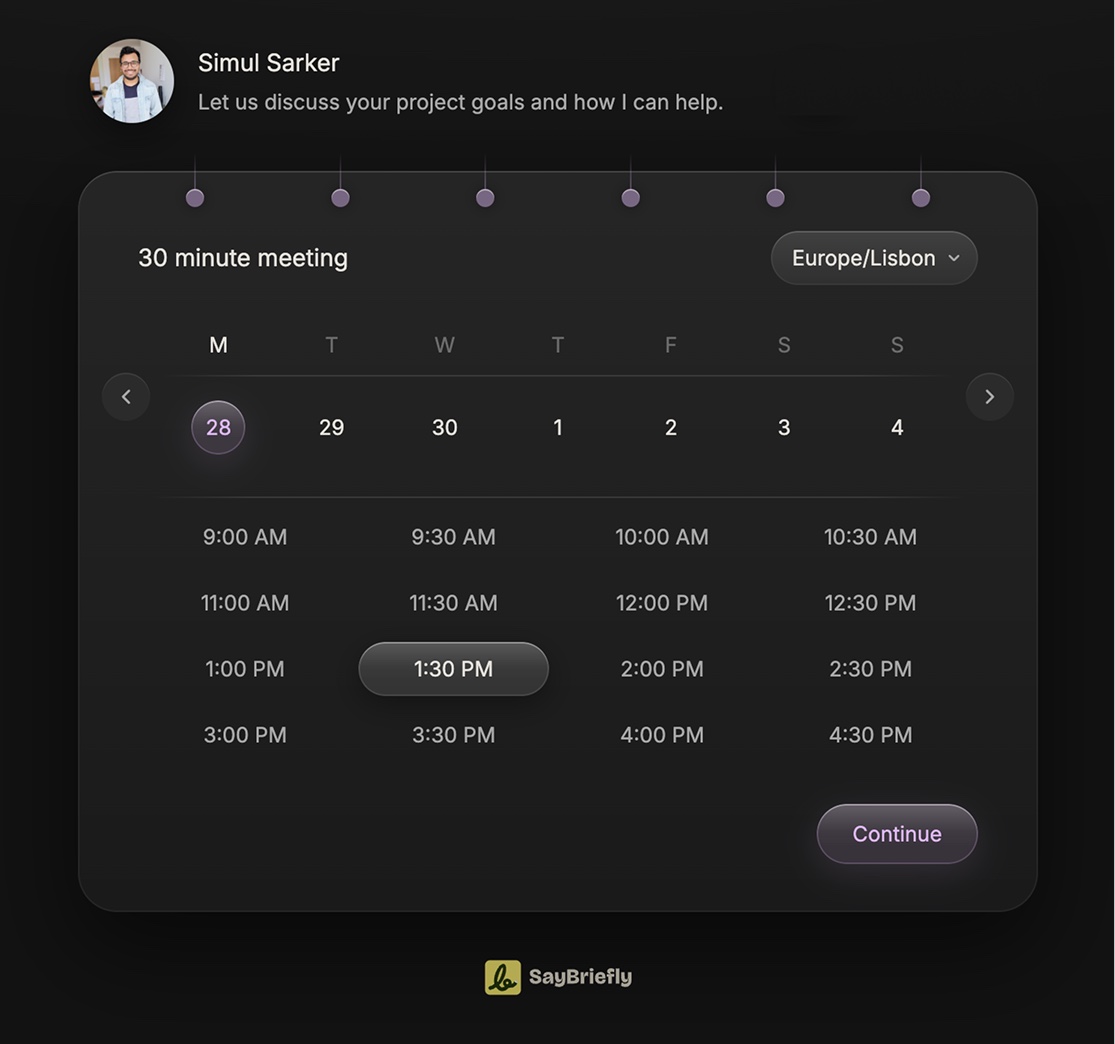
Then SayBriefly keeps going: it records the call with no bot, writes the note with tasks, links it to the client's project, and starts the next call's note with Since last call.
Why people switch to it
- The whole journey in one app: form, lead, contact, call, notes, next call
- A gated form that screens people before they see your calendar
- Bookers saved as contacts on their own, no separate CRM
- Bot-free notes and Since last call
Worth knowing
- No payments or round robin
- Routing a booker to a teammate is not built yet
- Google Calendar only, no Outlook
Pick SayBriefly if what a meeting achieves matters more than how it was booked.
2. Cal.com: best free and open source option
Cal.com is the most generous free option: Stripe and PayPal payments even on the free plan, buffers on every plan, and Google, Outlook and Apple calendars. It is open source, so you can host it yourself. Round robin and routing forms come with the Teams plan.
Good
- Payments on the free plan
- Open source and self-hostable
Worth knowing
- Cal.com branding on the free plan
- No notes after the call
Pick Cal.com if you want the most for free.
3. SavvyCal: best for small teams
SavvyCal has no free plan, but its Basic plan already includes round robin and buffers, with unlimited calendar connections. Paid bookings come with Premium.
Good
- Round robin from the first plan
- Unlimited calendar connections
Worth knowing
- No free plan
- Payments only on Premium
Pick SavvyCal if a small team shares the calendar.
4. TidyCal: best one-time price
TidyCal's free plan allows unlimited booking types and paid bookings, with a 1% platform fee. Its one-time Individual and Agency plans are the main draw, and it connects Google, Office 365 and Apple calendars on every plan.
Good
- Pay once, keep it
- Unlimited booking types free
Worth knowing
- 1% fee on paid bookings except on Pro
- TidyCal branding on the free plan
Pick TidyCal if you hate subscriptions.
5. Google Calendar appointment schedules: best if you live in Google
If you already use Google Calendar, appointment schedules give you a booking page without another app, with buffers and a daily booking cap. Some features need a paid Google plan, and it only works with Google Calendar.
Good
- No extra app
- Buffers and a daily cap
Worth knowing
- Google Calendar only
- Some features need a paid Google plan
Pick Google if a basic booking page is all you need.
Where SayBriefly is not the answer
Being straight about it: SayBriefly booking pages do not take payments, do not have round robin or team routing, do not send reminder emails to guests, and connect to Google Calendar only. If you sell paid sessions or route leads across a sales team, choose Cal.com, SavvyCal or Calendly.
Where Calendly still wins
Calendly is the most complete scheduling tool here: payments, routing forms, round robin, white-label on Teams, six calendar connections on paid plans, and now its own Notetaker and an email scheduling assistant. For large teams, it is still the safe choice.
How to choose a Calendly alternative
| Your situation | Our pick | Why |
|---|---|---|
| Freelancer or studio, the call is the work | SayBriefly | Booking plus bot-free notes and project memory |
| Want the most for free | Cal.com | Payments on the free plan, open source |
| Small team sharing calls | SavvyCal | Round robin from Basic |
| No subscriptions | TidyCal | One-time price |
| Already all-in on Google | Google appointment schedules | No extra app |
How we made this list
We checked each tool's own pricing and help pages in September 2026 and read reviews on Trustpilot and Capterra. Where a price was not clear on the vendor's own page, like Calendly's Standard plan, we left the number out. SayBriefly is our product, and we have been clear about what it does not do.
Questions people ask about Calendly alternatives
What is the best Calendly alternative?
For freelancers and studios who want the booked call to turn into notes, tasks and project context, SayBriefly. For teams that need payments and round robin, Cal.com or SavvyCal. For a one-time price, TidyCal.
Is there a free Calendly alternative?
Cal.com has a free-forever plan for one user, TidyCal has a free plan with unlimited booking types (with a 1% fee on paid bookings), and Google Calendar appointment schedules work on personal Google accounts.
Is Cal.com better than Calendly?
Cal.com is open source, can be self-hosted, and includes Stripe and PayPal payments even on its free plan. Calendly is more polished for large teams and has its own Notetaker. Both offer round robin on their team plans.
Which Calendly alternative has a lifetime deal?
TidyCal sells one-time plans: Individual at $29 and Agency at $79, according to its pricing page (checked September 2026).
Does Calendly take meeting notes?
Calendly lists a Notetaker that joins Zoom, Google Meet and Microsoft Teams calls to record, transcribe and share recaps. SayBriefly records from your computer with no bot, and links the notes to the client's project.
Can SayBriefly take payments or do round robin?
No. SayBriefly booking pages do not take payments, round robin or route bookers to teammates yet, and connect to Google Calendar only. If you need those, Cal.com, SavvyCal or TidyCal are better fits.
What makes SayBriefly booking different?
The booking is only the start. After the call, SayBriefly records it with no bot, writes the note with tasks, links it to the client's project next to their emails and the brief, and opens the next call's note with Since last call.
Can guests book without an account?
Yes. Guests pick a time on your SayBriefly booking page without signing up, and times are shown in their own time zone.
Can I screen leads before they book?
Yes. Switch a SayBriefly booking link to the gated flow and your form comes first; the calendar only opens once the required answers are in. You can also require your approval for each booking.
What happens if someone fills the form but does not book?
SayBriefly keeps them as a lead. They show in your Bookings so you can schedule them yourself, and they are added to your Contacts.
Does SayBriefly replace a CRM?
For many freelancers and studios, a light one. Everyone who books, fills your form, joins your meetings or gets a reply from you becomes a contact, with their meetings, emails and notes in one place. It is not a sales pipeline tool with deals and forecasts.