
The short answer
Granola remembers a meeting. The best Granola alternative remembers the whole project.
- SayBriefly: best overall. Bot-free notes on Mac and Windows, calls with the same people grouped into one thread, and every new note opening with "Since last call": what got done, what is still open, what was asked again and what changed. Its AI agent knows the calls, the client's emails and the brief.
- Fellow: best for internal teams that track action items together.
- Jamie: best for bot-free notes in many languages.
- Otter: best for full, searchable transcripts.
- Fireflies: best for teams happy with a bot and lots of integrations.
We build SayBriefly, so here is our bias up front. We think every Granola alternatives list gets the question wrong. They compare notes: how accurate, how fast, bot or no bot. That matters, and we cover it. But notes are not the problem. Granola can chat across your old notes, and that helps. What no meeting note taker does is tie each call to the client's project, next to their emails and the brief you agreed.
Real work does not happen in one meeting. It happens across ten calls, forty emails and a brief that everyone half remembers. The client who says "like we discussed" is pointing at a call from three weeks ago. Searching old notes for it is slow and easy to get wrong. Having it already linked, in order, next to the email that followed, is the gap SayBriefly was built to close.
A note taker remembers the meeting. SayBriefly remembers the project.
The real difference: memory
Here is what "memory" means in practice, and why it is the reason to switch.
Every call lands in its project
When a call ends, SayBriefly does not just file a note by date. It links the call to the right client project, next to that project's earlier calls, the client's emails from Gmail, the brief and the task board. Open the project and the whole story is there, in order.
Your calls with the same people become one thread
Weekly check-ins, a client you speak to every Thursday, a project that runs for three months: SayBriefly groups those calls into a thread by itself. It matches them by the same meeting link, the same calendar series or the same people. In your notes they stack under the latest call, and one click opens the whole history on a single line.
Every new note starts with "Since last call"
This is the part no other note taker does. When a call belongs to a thread, SayBriefly reads the previous calls before it writes the new note. The note then opens with what changed: what got done since last time, what is still open and who owes it, what the client asked for again, and what moved, like a launch date or a number.
Example of the layout. Real notes only show what was said on the calls.
Granola writes a good note of the call you just had. SayBriefly writes a note of where the whole relationship stands. You finish the call knowing what slipped, what repeats and what moved, without opening a single old note.
Granola tells you what was said. SayBriefly tells you what changed.
The agent knows the past and the present
SayBriefly's AI agent, Scribbble, reads across all of it. Ask "what did Lena want changed on the homepage, across all our calls?" or "did we ever agree to a second round of changes?" and it answers from every meeting, email and brief in the project, with the source. None of the other tools we checked says it reads your client email, so none of them can answer a question that spans last month's call and this morning's email.
You walk into every call prepared
Before the next call in a thread, ask what is still open with this client: the tasks you owe, the questions they asked last time, the decisions that are not written down yet. The prep that used to mean scrolling through old notes takes one question.
Changes get caught, because the history is there
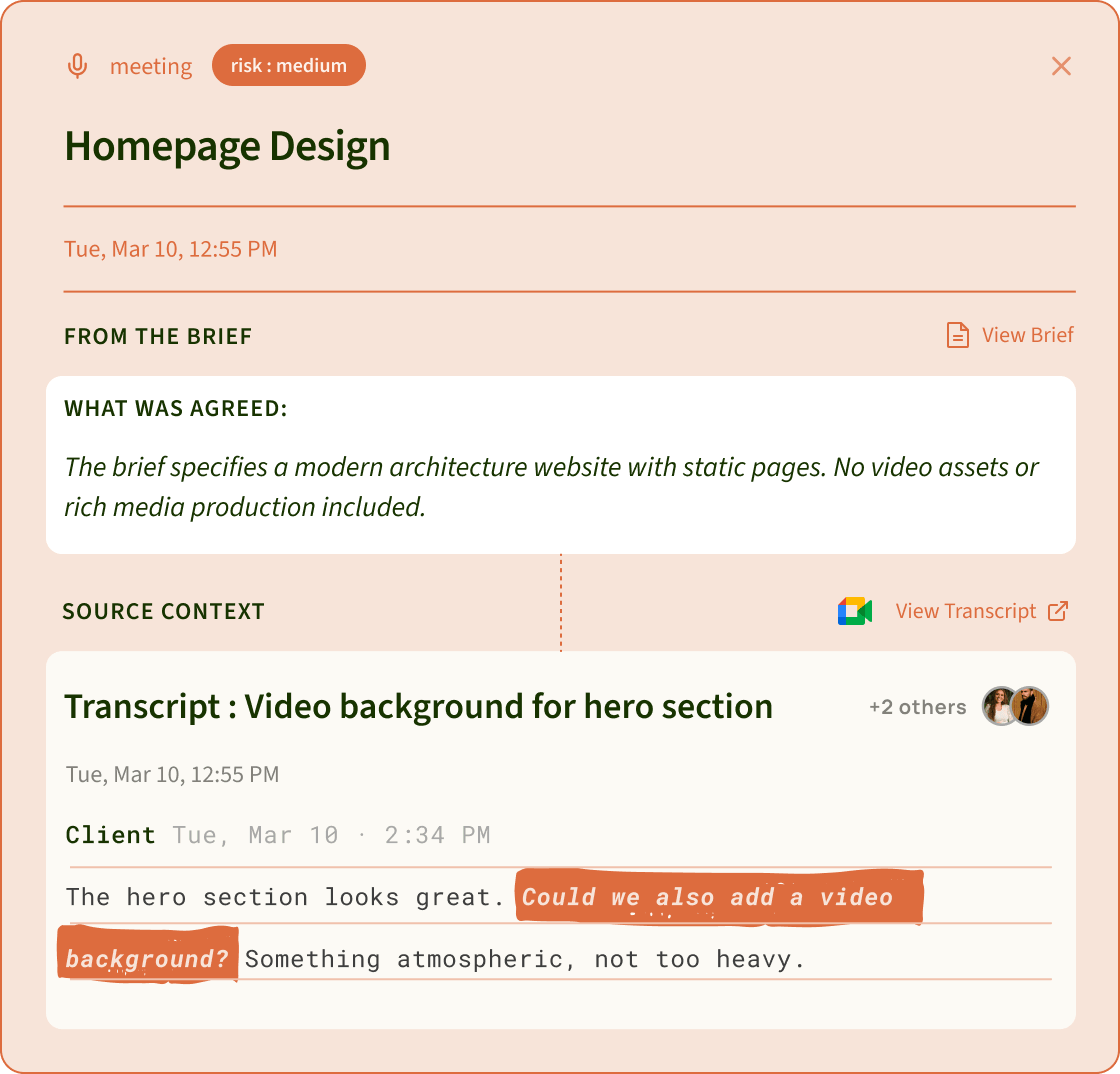
Because SayBriefly knows what was agreed, it can tell when something new is asked. Lock the brief, and a request that goes beyond it is flagged with the client's exact words and the brief line it goes past. This is only possible because the memory is there. A single meeting note has nothing to compare against.
SayBriefly vs Granola, head to head
First the basics, because a Granola alternative has to beat Granola at notes before anything else matters. Then everything that happens after the notes.
 SayBriefly SayBriefly |  Granola Granola | |
|---|---|---|
| No bot in the call | Yes | Yes |
| Mac and Windows apps | Yes | Yes |
| iPhone and Android apps | No | Yes |
| Speaker names | Real names on Google Meet, and it learns the voices of people you meet often | Not stated on its site |
| Action items with owners | Yes | Yes, as next steps in the note |
| Tasks on a real to-do list | Yes, with Plan My Day and a Kanban board | Not stated on its site |
| Calls linked to client projects | Yes, automatically | Not stated on its site |
| Client email next to the calls | Yes, Gmail | Not stated on its site |
| AI chat across past meetings | Yes, Scribbble | Yes |
| AI agent across calls, client email and the brief | Yes, Scribbble | Meetings only |
| "Since last call" on every new note | Yes: done, still open, asked again, changed | Not stated on its site |
| Booking links and calendar | Yes | Not stated on its site |
| Dictation into any app | Yes | Not stated on its site |
| Scope creep alerts | Yes, against your locked brief | Not found on its site |
Granola column checked on granola.ai, September 2026. "Not stated" means we could not confirm it on their site either way.
Why people leave Granola
Most people who switch like Granola's notes. They leave because the notes do not lead anywhere.
1. The history is there, but not connected
Granola keeps your notes and can chat across them. But a call is not linked to the client's project, their emails or the brief, so the story of a client lives in pieces you have to put back together yourself.
2. Tasks stay inside the note
Next steps sit in the note. Moving them to the list you actually work from is your job, and with five clients and three calls a day, that is where promised tasks slip.
3. Half the conversation is in email
Clients say one thing on a call and something slightly different in an email two days later. A meeting note taker only ever sees the call.
4. One app becomes five
Notes in Granola, tasks in Todoist, booking in Calendly, dictation in another app, questions in ChatGPT. Each one knows a slice. None knows the client.
5. History and plan limits
Granola's Basic plan keeps 30 days of notes. The Business plan is listed at $14 per user per month.
All 5 Granola alternatives at a glance
| Tool | Best for | Bot in the call? | Mac + Windows | Tasks from meetings | Scope creep alerts |
|---|---|---|---|---|---|
| SayBriefly | Freelancers and studios | No bot | Yes | Yes, on your to-do list | Yes, against your locked brief |
| Granola | Clean bot-free notes | No bot | Yes | Next steps inside the note | No |
 Fellow Fellow | Internal team meetings | Bot or botless | Yes | Yes, with owners and due dates | No |
 Jamie Jamie | Many languages, no bot | No bot | Yes | Task detection | No |
 Otter Otter | Searchable transcripts | Bot by default, or its desktop app | Yes | Action items on Pro and up | No |
 Fireflies Fireflies | Teams fine with a bot | Bot, or a Chrome extension | Desktop app | Task detection | No |
Checked on each tool's own website, September 2026. "No" means we found nothing like it on their site.
The 5 best Granola alternatives, reviewed
1. SayBriefly: best Granola alternative overall
On the basics, SayBriefly does what Granola does: it records the call from your computer with no bot, works with Google Meet, Zoom, Teams and browser calls, and has the note ready about a minute after you hang up, with decisions, action items and owners.
The difference is everything around the note. Each call is linked to its client project, next to the earlier calls, the client's emails and the brief. Tasks go onto one to-do list you plan your day from. Booking links, your calendar and dictation live in the same app. And Scribbble, the agent, answers questions across all of it, past and present. It is the difference between a notebook and a memory.
Why people switch to it
- Every call linked to its project, with past calls and client email
- An AI agent that knows the whole history, not one meeting
- Notes, tasks, calendar, booking and dictation in one app
- Scope creep alerts against your locked brief
Worth knowing
- No iPhone or Android app yet
- Email works with Gmail for now
Pick SayBriefly if your work runs across many calls with the same people.
See how it works on the SayBriefly AI notetaker page.
2. Fellow: best for internal team meetings
Fellow is built for teams that run a lot of meetings with each other. Action items get owners and due dates, and they can sync to Asana, Jira and Monday. You can let a bot join, go botless, or record in person. If your week is standups and one-to-ones, Fellow is a strong choice.
Good
- Real action items with owners and due dates
- Bot or botless, your choice
Worth knowing
- The free plan ends after 5 notes and 5 recordings
- Made for team meetings, less for client projects
Pick Fellow if your meetings are mostly internal.
3. Jamie: best for bot-free notes in many languages
Jamie runs on your device without a bot, like Granola, and handles meetings in 99+ languages with a strong focus on GDPR. It detects tasks in your notes and can send them to Asana on its Pro plan. For consultants who switch languages between clients, it is the most natural fit.
Good
- No bot, many languages
- Strong privacy and GDPR story
Worth knowing
- The Plus plan is capped at 20 notes a month
- Tasks are managed outside the app
Pick Jamie if your calls happen in more than one language.
4. Otter: best for searchable transcripts
Otter is the transcript specialist. Its bot joins Zoom, Teams and Google Meet automatically once your calendar is connected (the desktop app can record without it), and you get a searchable transcript with speakers labelled. On Pro and above, its Takeaways panel assigns action items. If you need to find the exact words from a call three months ago, Otter is built for that.
Good
- The lowest paid entry price in this list
- Full transcripts you can search and share
Worth knowing
- The bot joins by default; bot-free needs the desktop app
- Pro meetings are capped at 90 minutes
Pick Otter if the transcript itself is what you need.
5. Fireflies: best for teams that are fine with a bot
Fireflies records through a bot by default, and offers a Chrome extension if you want to skip the bot. It detects tasks and connects to a long list of tools. Sales and customer teams that already live in a CRM tend to like it.
Good
- A long list of integrations
- A Chrome extension option without the bot
Worth knowing
- The bot is the default way of recording
- Free plan storage runs out quickly
Pick Fireflies if a bot in the call is fine for your clients.
One client call, two tools
Here is how memory plays out on a real kind of call. A studio is building a five-page website. Three weeks ago, on the kickoff call, everyone agreed: five pages, two rounds of changes, no online shop in this phase. Forty minutes into today's friendly review call, the client says:
"Love it. While we're at it, could we add a small shop for the launch? Nothing fancy."
Granola writes it into today's note as a next step. It is accurate. Nothing in that note checks it against what was agreed on the kickoff call three weeks ago.
SayBriefly writes the same note. It also remembers the kickoff call and the brief that came out of it, so it raises this:
You decide what happens next: include it, send a change quote, or move it to phase two. SayBriefly never answers the client for you. It makes sure you decide before anyone builds the shop.
- Lock the brief once. What is in, what is out, how many pages and rounds. SayBriefly can draft it from your kickoff call and emails.
- Work as usual. Calls, Gmail, the Figma file and the Slack channel you link to the project.
- Get the alert, then decide. The client's words and the brief line, side by side, with a link to the exact moment.
Where Granola still wins
Being fair matters here. If most of your calls are internal, you want clean notes and nothing else, and you record meetings in person on your phone, Granola is simple and very good at its one job. It has mobile apps on iOS and Android, which SayBriefly does not. If none of the client problems above sound familiar, stay with Granola.
How to choose a Granola alternative
| Your situation | Our pick | Why |
|---|---|---|
| Freelancer with clients | SayBriefly | Notes, tasks and scope checks in one app |
| Small studio or agency | SayBriefly | Scope alerts protect margins across the team |
| Internal team meetings | Fellow | Shared action items with owners and dates |
| Calls in several languages | Jamie | No bot, 99+ languages |
| Need the full transcript | Otter | Searchable, speaker-labelled transcripts |
| Sales team, bot is fine | Fireflies | Integrations and task detection |
How we made this list
We checked every tool's own pricing page and product pages in September 2026 and only wrote down what they state. Where a site did not say something, we left it out instead of guessing. Prices change often, so check the current price before you buy. SayBriefly is our product, and we have been clear about where other tools are the better choice.
Questions people ask about Granola alternatives
What is the best Granola alternative?
SayBriefly. It matches Granola on the basics, bot-free notes on Mac and Windows, and then links every call to its project, next to the past calls, client emails and the brief. Its AI agent answers questions across all of it, so your notes become a memory of the whole project instead of a list of separate meetings.
What is Since last call in SayBriefly?
When a call belongs to a thread (same meeting link, same calendar series or the same people), SayBriefly reads the previous calls first. The new note then opens with what got done, what is still open and who owes it, what the client asked for again, and what changed, like a date or a number.
Which Granola alternative remembers past meetings?
SayBriefly links each call to its client project and keeps the earlier calls, emails and brief together. You can ask its agent about anything said across all of them, like what a client asked for three calls ago, and get the answer with its source.
Is there a Granola alternative without a bot?
Yes. SayBriefly and Jamie record from your computer and no bot joins the call. Fellow lets you choose a bot or go botless. Otter's bot joins by default, but its desktop app can record without it. Fireflies uses a bot by default with a Chrome extension as the no-bot option.
Does Granola work on Windows?
Yes. Granola lists Mac, Windows, iOS, Android and web on its site. SayBriefly, Fellow, Jamie and Otter also have Windows apps.
How much does Granola cost?
Granola has a Basic plan with 30 days of note history. Its Business plan is listed at $14 per user per month on its pricing page (checked September 2026).
Which AI note taker turns meetings into tasks?
Fellow tracks action items with owners and due dates and can push them to Asana, Jira and Monday. SayBriefly puts meeting tasks and client email tasks on one to-do list, with a Kanban board for bigger projects. Jamie, Otter and Fireflies detect action items inside their notes.
Can an AI note taker catch scope creep?
SayBriefly does. Once you lock a project brief, it checks client calls, Gmail, linked Figma files and linked Slack channels against it and flags any request outside the brief, with the client's exact words and the brief line it goes beyond. We found no similar feature on the other tools' websites.
Do my clients know I am taking notes?
With a bot-free tool, nothing joins the call, so they will not see a bot. It is still good practice to tell clients you take notes. Many studios say it at the start of the first call or put it in the contract.
Granola vs Fellow vs Otter: which should I pick?
Granola for simple bot-free notes. Fellow for internal teams that track action items together. Otter for full, searchable transcripts where a bot is fine. For client work where follow-up and scope matter, SayBriefly.
Can I switch from Granola without losing my old notes?
Keep Granola's notes where they are, or export what you need before your history window runs out, and start new calls in the new tool. Most people run both for a week, then keep one.
Does SayBriefly work with Zoom, Google Meet and Teams?
Yes. SayBriefly records the call from your computer, so it works with Google Meet, Zoom, Microsoft Teams and calls in the browser, with no bot joining.